01 / Enter context
Start with a real use case
Add the organization type and approximate size, one workforce challenge, and one employee's role, experience, skills, development areas, goal, and timeline.
For HR and L&D teams
When a workforce gap needs follow-through, EvoluTalent records organization context, then organizes one selected challenge and HR-entered employee details into a structured, editable draft for HR and manager review.
14 days · one challenge · one employee plan per signed-in account
Why EvoluTalent
Compared with a blank template, the HR Pilot carries the selected challenge and employee details into editable plan sections, then keeps saved goal statuses and dated goal history with the plan.
01 / Enter context
Add the organization type and approximate size, one workforce challenge, and one employee's role, experience, skills, development areas, goal, and timeline.
02 / Shape a draft
EvoluTalent arranges entered skills and development areas with suggested activities, 30/60/90-day goals, and manager prompts for HR and manager review.
03 / Work the plan
During the active 14-day Pilot, edit eligible gap, activity, and goal labels and descriptions and update activity and goal statuses. Saved goal history remains readable after expiry.
How it works
These captures follow the current 14-day flow: one challenge and one employee plan. The walkthrough uses Jordan Example (fictional) and a fictional sample goal throughout.
01
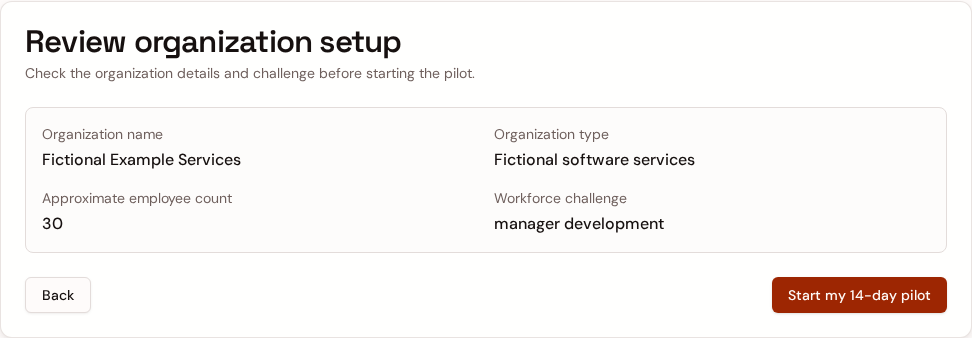
Enter the organization type and approximate size, then select one workforce challenge. This example uses Fictional Example Services, an approximate size of 30, and manager development.
02
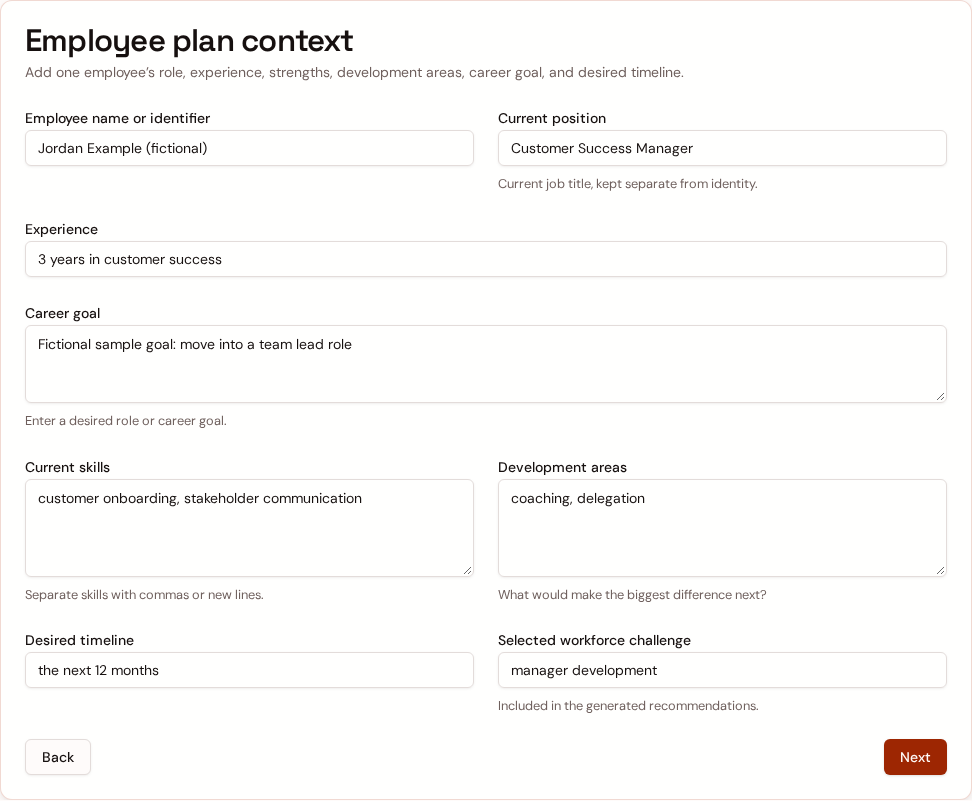
Jordan Example (fictional) is entered as a Customer Success Manager with three years of experience. The fictional sample goal is to move into a team lead role; the form also captures skills, development areas, and the next-12-month timeline.
03
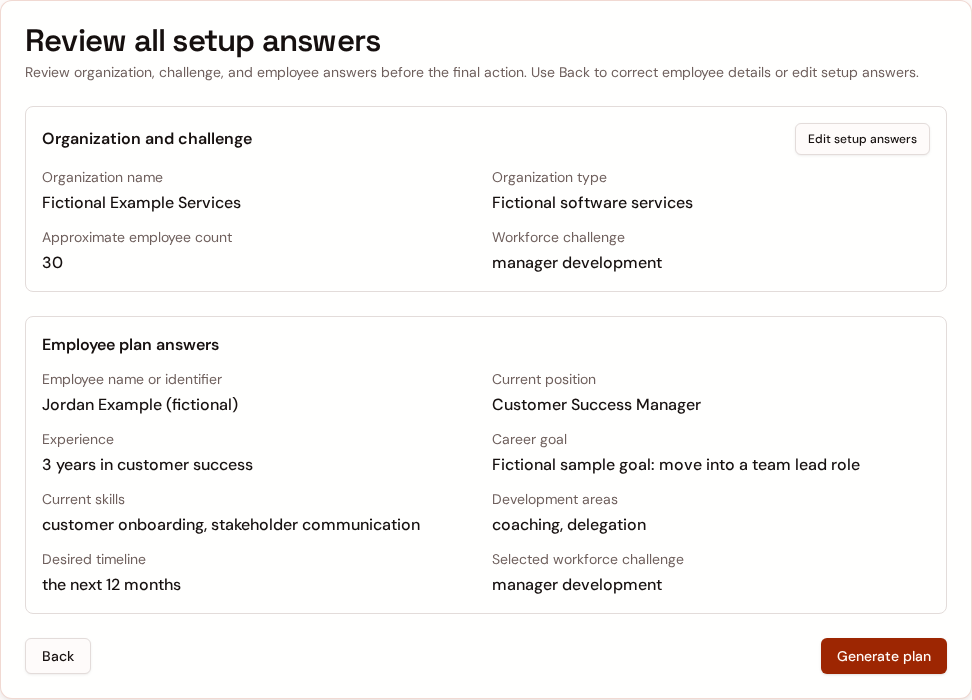
Review the organization and employee answers, then use the actual Generate plan action. A successful submission opens the saved 90-day development plan.
04
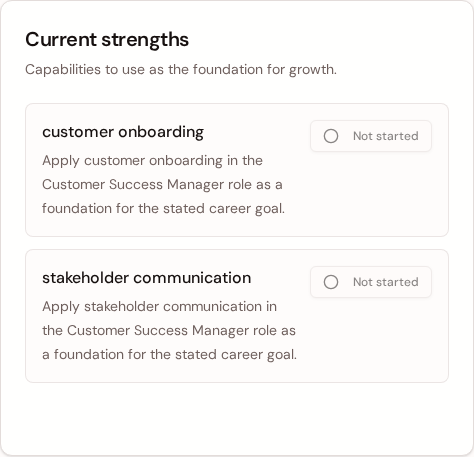
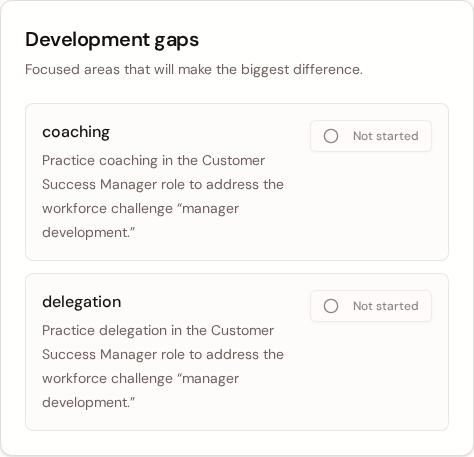
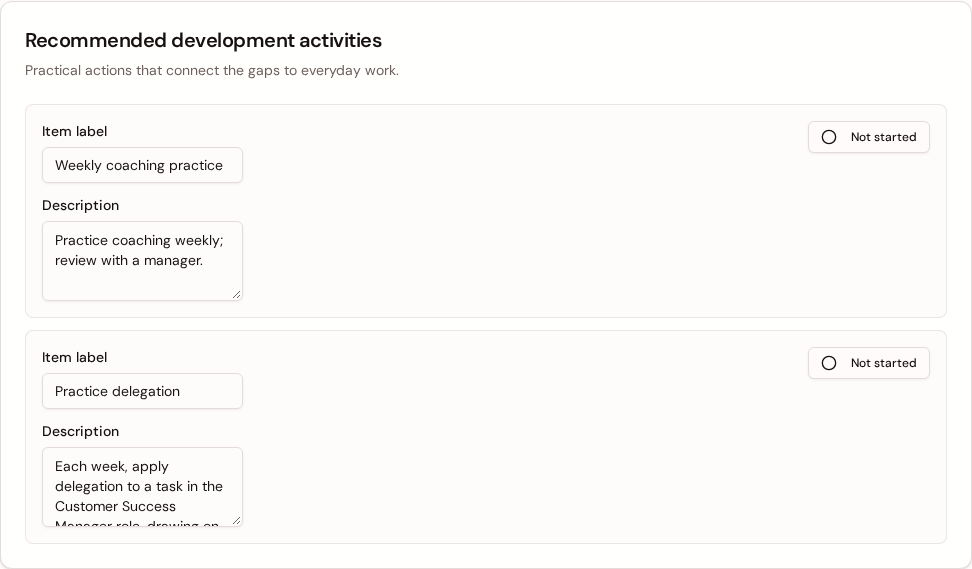
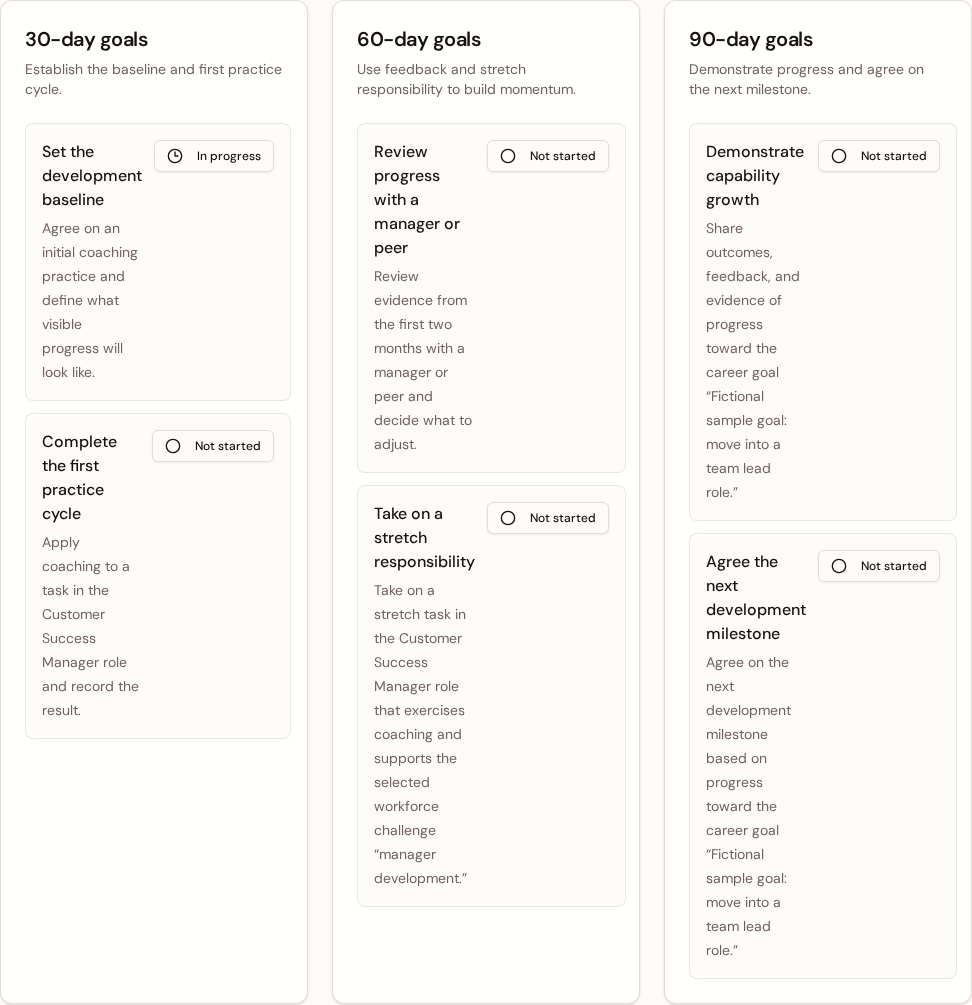
The saved plan shows current strengths, development gaps, suggested activities, and 30-, 60-, and 90-day goals. In this fictional example, the generated “Practice coaching” activity was edited to “Weekly coaching practice” and saved as “Practice coaching weekly; review with a manager.”
These are suggestions for HR and manager review. During the active 14-day Pilot, eligible gap, activity, and goal labels and descriptions can be edited. After expiry, the saved plan remains readable but is read-only.
05
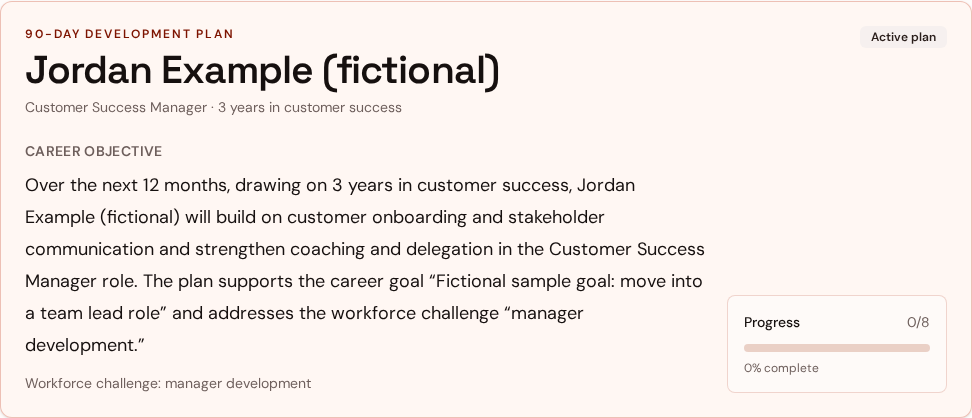
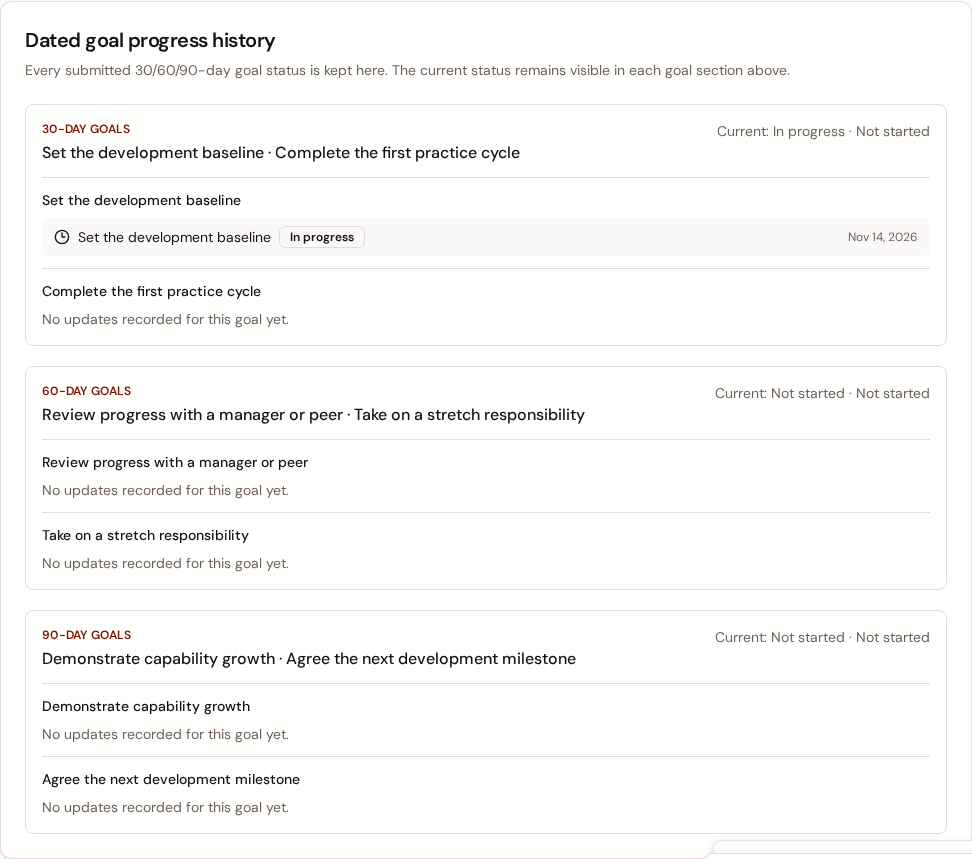
The product summary reports 0/8 goals and activities complete. In this fictional sample, one goal is in progress and its dated status appears in the history below; this is sample workflow activity, not an employee or customer outcome.
Business-value measurement
The Pilot is a 14-day, one-challenge, one-plan workflow. Use the methods below to assess value with your own baseline and follow-up; a saved status is not proof of an employee or business outcome.
None are available to publish: current public data has no verified HR Pilot outcome findings or authorized testimonials. Product screens and the illustrative plan show workflow, not outcomes. Any future result should name its actual-use source, cohort, period, and scope.
No numeric planning-time estimate or ROI is published because customer-specific inputs are not established. The optional planning-time formula below requires every input and assumption to be stated.
Planning efficiency, useful and actionable plans, adoption, manager follow-through, development progress, and retention are outcomes to assess—not established EvoluTalent results.
The Pilot records onboarding start/completion and first employee/plan activation events, a saved plan with current activity and goal statuses, goal-status history, and dated check-in records. These describe workflow in a one-account, one-plan Pilot. The app does not automatically measure time to a usable plan, usefulness ratings, revisits, complete update counts, agreed-action completion, independently verified milestone results, or long-term retention.
Customer assessment methods
Customer-collected labor time
Measure from the start of planning to a customer-defined usable plan after HR/manager review and editing. Include total HR and manager labor, then compare with a like-for-like baseline of similar scope and review.
The Pilot has no time-to-usable-plan timer or labor-time field; timing is not app-measured.
Customer-collected review
After review, collect consistent HR/manager ratings for relevance and actionability. Also record which suggested items remain usable after editing.
The Pilot has no built-in usefulness or satisfaction rating; these are not app-measured.
Workflow records plus customer tally
Define what counts as completion and the eligible account or plan denominator first. Count completed accounts/plans, revisits, and updates against that denominator.
Activation events record onboarding start/completion and first employee/plan creation. Saved statuses and goal-status history show recorded status. Revisits and complete update counts are not dedicated usage events; tally them separately.
Check-ins plus customer follow-up
Use saved dated check-ins to assess recorded frequency. For each agreed action, keep a follow-up record with its owner, due date, and completion evidence.
A check-in stores a date and note, with an optional goal link and submitting account identity. A dated note alone does not prove manager participation or that an agreed action happened.
Agreed milestones and reviewed evidence
Agree milestones, evidence, and review dates with HR and the manager; review the evidence at those planned intervals against customer-defined criteria.
Suggested 30/60/90-day goals and saved activity/goal status changes or goal-status history record workflow status, not verified capability growth or milestone results.
Customer HR records over time
Use customer HR records for a defined group and an appropriate longer-term follow-up period. Document the cohort, period, and comparison used.
The 14-day Pilot does not measure retention or establish that it caused a change. Compensation, role, management, labor-market conditions, and other factors also contribute.
Evidence
There are no verified HR Pilot findings or authorized testimonials in the current public data. Product screens and the illustrative plan above demonstrate functions, not outcomes.
Separate offers
The HR Pilot and EvoluTalent Learn have different scope and terms.
14-day HR Pilot
A self-serve starting point for HR and L&D teams. The plan is an input-driven draft for review, not an independent assessment or HR-approved result.
Includes current strengths, development gaps, recommended activities, 30/60/90-day goals, manager prompts, and progress tracking.
While active eligible gap, activity, and goal labels and descriptions can be edited. Activity and goal statuses can be updated, and dated manager check-ins can be recorded.
After day 14 the saved plan remains readable but becomes read-only.
Payment there is no checkout step in the Pilot start flow. The current pricing source does not define a separate HR Pilot fee.
EvoluTalent Learn
Annual billing includes two months free.
starter
1–15 seats
$49/ month
$490/ year
team
16–100 seats
$199/ month
$1,990/ year
growth
101–500 seats
$399/ month
$3,990/ year
Displayed amounts are subscription totals for each tier, not per-seat prices.
Frequently asked questions
The 14-day Pilot covers one workforce challenge and one employee development plan per signed-in account. HR enters organization type and approximate size, selects the challenge, then adds an employee name or identifier, current role, experience, skills, development areas, career goal, and desired timeline. After reviewing the answers and explicitly generating the plan, HR gets an editable, structured set of recommendations: a development objective, ways to apply entered strengths, priority development areas, specific actions, 30/60/90-day milestones, manager support and check-in prompts, and observable evidence to review. The content is input-driven and intended for HR and manager review; it is not a diagnosis, validated assessment, guaranteed result, or completed HR-approved outcome.
Onboarding asks for a company name, organization type, approximate employee count, and one workforce challenge. For the plan, HR enters an employee name or identifier, current position, experience, current skills or strengths, development areas, career goal, and desired timeline. HR can review and correct these answers before choosing Generate plan.
The deterministic plan builder uses entered skills as current strengths and entered development areas as priorities. Its suggested objective connects the employee’s role, goal, strengths, development areas, desired timeline, and selected workforce challenge. Actions, milestones, manager prompts, and evidence-to-review suggestions point back to those inputs. Organization type and approximate size remain in Pilot setup context. This is not AI analysis, a diagnosis, an independent conclusion, or a validated assessment.
During the active Pilot, HR can revise and save the suggested objective, how entered strengths are applied, development priorities, actions, 30/60/90-day milestones, manager prompts, and success measures from the saved plan. No setup restart or regeneration is needed, and the source answers stay distinct. Content edits retain existing progress and dated manager check-ins. Activity and milestone status controls record progress. After expiration, the saved plan is read-only.
Create an EvoluTalent account, then enter the organization information, choose one workforce challenge, and add one employee’s context. Review the organization, challenge, and employee answers before explicitly choosing Generate plan. The HR Pilot start flow has no checkout step. The resulting recommendations are editable suggestions for HR and manager review.
The saved plan remains readable, but it becomes read-only. Plan edits, progress updates, and new manager check-ins are closed after expiration.
There is no checkout step in the HR Pilot start flow. The current pricing source defines EvoluTalent Learn subscription prices but does not define a separate HR Pilot fee or a later conversion term.
EvoluTalent Learn is the available paid subscription for courses. All Learn tiers include the course library, lesson progress, completion certificates, and employee sharing and assignment; Team adds seat-based access, and Growth adds the Learn admin console. The HR Pilot is a separate 14-day, one-challenge, one-plan experience.
Starter is $49 per month or $490 per year for 1–15 seats. Team is $199 per month or $1,990 per year for 16–100 seats. Growth is $399 per month or $3,990 per year for 101–500 seats. Annual billing includes two months free. These are tier subscription totals, not per-seat prices.
Demonstrated results measured in actual use: none are available to publish; current public data has no verified HR Pilot findings or authorized testimonials. Screens and the illustrative plan show workflow, not outcomes. Intended efficiency, usefulness, adoption, follow-through, development progress, and retention benefits remain to be assessed. Current records are onboarding/plan activation events, saved activity/goal statuses, goal-status history, and dated check-in notes. The Pilot does not measure usable-plan time, usefulness ratings, revisits, complete update counts, completed actions, verified milestones, or retention. Assess planning efficiency by timing total HR/manager labor through review and editing until a customer-defined usable plan, then compare a like-for-like baseline. After review, collect consistent relevance/actionability ratings and count suggestions kept usable. Define adoption completion and an account/plan denominator; count activation events and tally revisits/updates separately. Pair dated check-ins with separate action owners, due dates, and completion evidence. Agree development milestones and review evidence at intervals; statuses do not prove skill growth. Use customer HR records for long-term retention and account for other factors; a 14-day Pilot cannot establish cause. No numeric estimate is published. If you estimate planning time value, use Annual planning labor value = plans created per year × net hours saved per plan × relevant hourly labor cost. State plans/year, net hours saved per plan including review/editing, and hourly labor cost. Label the result time value—not necessarily payroll savings—and include only established customer subscription/implementation costs in any net-value estimate. No separate Pilot fee is defined.